Container Security
Keep your containers secure with SailOps security features.
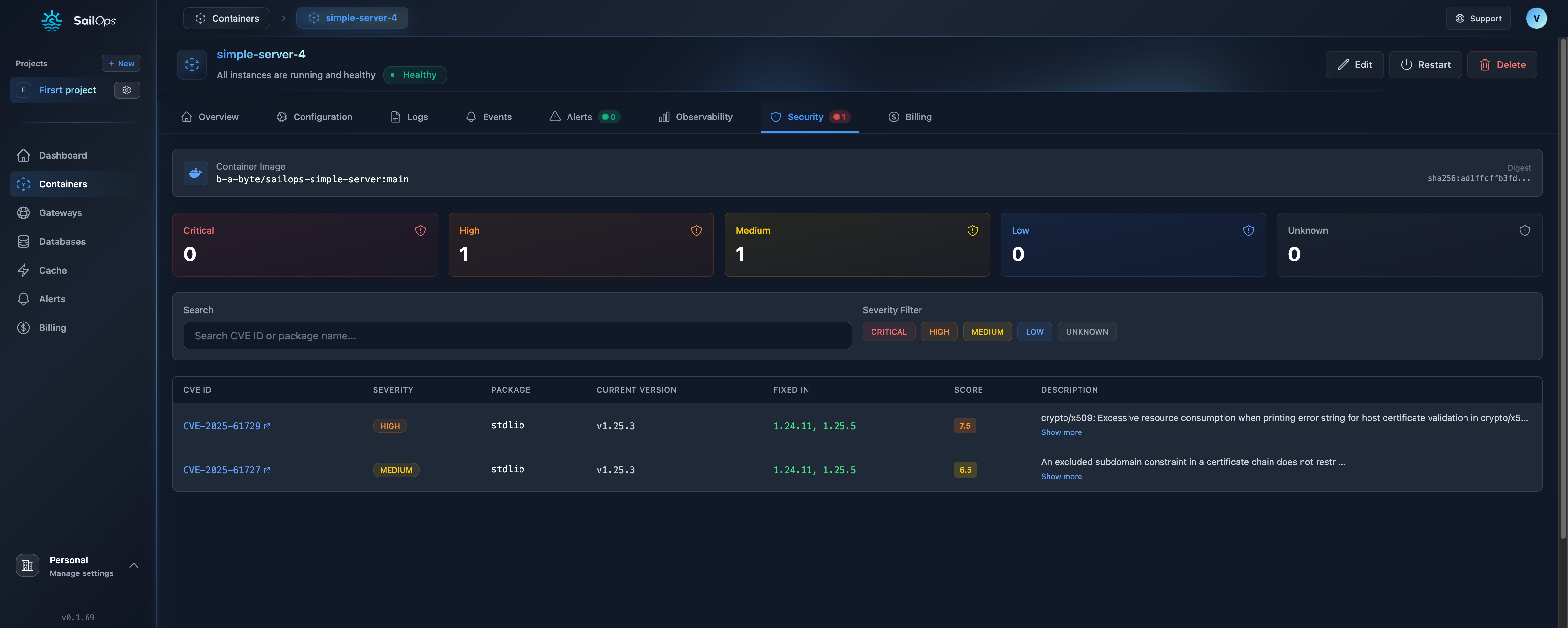
Security Overview
SailOps provides multiple layers of security for your containers:
- Strong container isolation - Each container runs in a fully isolated environment
- Network isolation between projects
- Encrypted communication (TLS everywhere)
- Secure secrets management
- Optional security context for additional hardening
- Read-only file systems option
- Resource limits to prevent abuse
Container Isolation
All containers on SailOps benefit from strong isolation by default. Each container runs in a fully isolated environment, meaning:
- Containers cannot access other containers or the host system
- Root inside the container is safe and does not compromise security
- No additional configuration needed for secure operation
SailOps isolation ensures that even if an attacker compromises your application, they cannot escape to affect other containers or the infrastructure.
Security Context (Optional)
Thanks to our strong isolation, security context settings are optional. You only need to configure them for compliance requirements or additional hardening.
| Scenario | Security Context Needed? |
|---|---|
| Standard workloads | No - isolation is sufficient |
| Compliance requirements | Yes - enables audit controls |
| Defense in depth | Yes - adds application-level restrictions |
| Legacy apps needing root | No - root is safe with our isolation |
Network Security
Project Isolation
Each project runs in an isolated network namespace:
- Containers can only communicate within their project
- Cross-project communication requires explicit gateways
- External traffic must go through gateways
Internal DNS
Containers communicate using internal DNS within the same project:
{service-name}.{namespace}
For example, if your container is named backend in the namespace my-project-abc123:
backend.my-project-abc123
This DNS is only resolvable within the same project namespace.
Ingress Protection
All external traffic passes through gateways:
- Automatic TLS termination
- DDoS protection
- Rate limiting (configurable)
Secrets Management
Environment Variables
Store secrets as environment variables:
- Go to container Configuration
- Add variable with Secret toggle enabled
- Value is encrypted at rest
- Hidden in UI and logs
Best Practices
| Do | Don't |
|---|---|
| Use environment variables | Hardcode secrets in images |
| Rotate secrets regularly | Share secrets across projects |
| Use different secrets per env | Log secrets accidentally |
| Encrypt secrets at rest | Commit secrets to git |
Secret Rotation
To rotate a secret:
- Update the environment variable
- Container restarts automatically
- New value takes effect immediately
Container Hardening
Security Context (Optional)
SailOps provides strong container isolation by default. You can optionally configure a security context for additional hardening.
To configure:
- Go to your container configuration
- Navigate to Advanced Settings > Security Context
- Set Run As User ID (e.g.,
1000) - Set Run As Group ID (e.g.,
1000) - Save changes
When configured, SailOps automatically applies additional security restrictions including non-root enforcement and read-only filesystem.
Without security context configuration, containers run with strong isolation. This is sufficient for most workloads and allows containers to run as root if needed.
Running as Non-Root (Optional)
If you configure a security context, ensure your Dockerfile specifies a matching non-root user:
# In your Dockerfile
USER 1000:1000
Running as Root (Default)
Without security context configuration, containers can run as root. This is safe because:
- Strong isolation protects the host and other containers
- Root inside the container ≠ root on the host
- Perfect for legacy applications requiring root
# No USER instruction needed
# Container runs as root (safe with SailOps isolation)
FROM nginx:alpine
Read-Only Filesystem
When security context is enabled, the root filesystem becomes read-only. SailOps automatically mounts a writable /tmp directory (1GB limit) for temporary files.
You don't need to configure anything for temporary files. SailOps provides a writable /tmp directory automatically, regardless of security context settings.
Resource Limits
Resource limits prevent runaway processes:
| Resource | Limit | Purpose |
|---|---|---|
| CPU | Per compute class | Prevent CPU starvation |
| Memory | Per compute class | Prevent OOM |
| File Descriptors | 65535 | Prevent resource exhaustion |
| Processes | 1000 | Prevent fork bombs |
Image Security
Use Official Images
Prefer official images from trusted sources:
# Good
FROM node:20-alpine
FROM python:3.12-slim

# Avoid
FROM random-user/node:latest
Keep Images Updated
Regularly update base images to get security patches:
docker pull node:20-alpine
docker build --no-cache .
Scan Images
Scan images for vulnerabilities before deployment:
- Docker Scout
- Trivy
- Snyk
Minimal Images
Use minimal base images:
| Base Image | Size | Security |
|---|---|---|
| Alpine | ~5MB | Minimal attack surface |
| Distroless | ~20MB | No shell, no package manager |
| Debian-slim | ~80MB | Balance of size and utilities |
Secure Dockerfile Practices
Example Secure Dockerfile
# Use specific version, not 'latest'
FROM node:20-alpine
# Create non-root user
RUN addgroup -g 1001 app && \
adduser -u 1001 -G app -s /bin/sh -D app
# Set working directory
WORKDIR /app
# Copy package files first (layer caching)
COPY package*.json ./
# Install dependencies
RUN npm ci --only=production
# Copy application code
COPY . .
# Switch to non-root user
USER app
# Expose port
EXPOSE 3000
# Define health check
HEALTHCHECK \
CMD wget --no-verbose --tries=1 --spider http://localhost:3000/health || exit 1
# Start application
CMD ["node", "server.js"]
Security Checklist
- Use specific image tags, not
latest - Consider security context for compliance requirements
- Use multi-stage builds
- Don't copy unnecessary files
- Remove development dependencies
- Don't store secrets in image
Network Policies
Default Behavior
- All containers in a project can communicate
- External access only via gateways
- No access between projects
Restricting Access
Contact support for custom network policies:
- Restrict container-to-container traffic
- Limit egress destinations
- IP whitelisting for ingress
Compliance
Data Protection
- Data encrypted in transit (TLS)
- Data encrypted at rest by the hosting infrastructure
- Data hosted in Paris, France (European Union)
- GDPR compliance
Access Control
- Role-based access control (RBAC)
- API key management
- Sign-in with Google or GitHub
- Two-factor authentication (TOTP)
Security Monitoring
Alerts
Set up security alerts for:
- Container crashes (potential attacks)
- Unusual resource usage
- Failed health checks
- Image pull failures
Incident Response
If You Suspect a Breach
- Isolate - Stop affected containers
- Investigate - Review logs and events
- Notify - Contact [email protected]
- Remediate - Rotate secrets, update images
- Document - Record findings
Support Contact
For security issues:
- Email: [email protected]
- Response time: < 4 hours
Best Practices Summary
| Category | Recommendation |
|---|---|
| Isolation | Strong isolation is automatic - no configuration needed |
| Images | Use minimal, official, updated images |
| Secrets | Use environment variables, never in code |
| Security Context | Optional - enable for compliance or defense in depth |
| Network | Use internal DNS, gateway for external |
| Monitoring | Set up alerts for anomalies |
| Updates | Keep dependencies current |